

To write queries directly using a text-based language, use MPL (Metrics Processing Language).To migrate existing PromQL queries to Axiom, see Migrate PromQL queries to Axiom.
Concepts
- Dataset: A group of related metrics.
- Metric: A measurement that tracks a specific aspect of your system over time.
- Tag: A key-value pair identifying a series.
- Series: A unique combination of a metric and tag set.
Build metrics query
To build a typical metrics query:- Click the Query tab.
- Click Builder in the top left.
- In Dataset, define the source of your query. Select an OTel metrics dataset, and then select the metric you want to query.
- In Where, filter the results. Restrict the query to a set of series whose tag values match the conditions you specify.
- In Transformations, select the transformations you want to apply to the data.
- Click Run.
The metric selector only shows metrics that were active during the selected time range. Expand the time range to see more metrics in the dropdown.
Example query
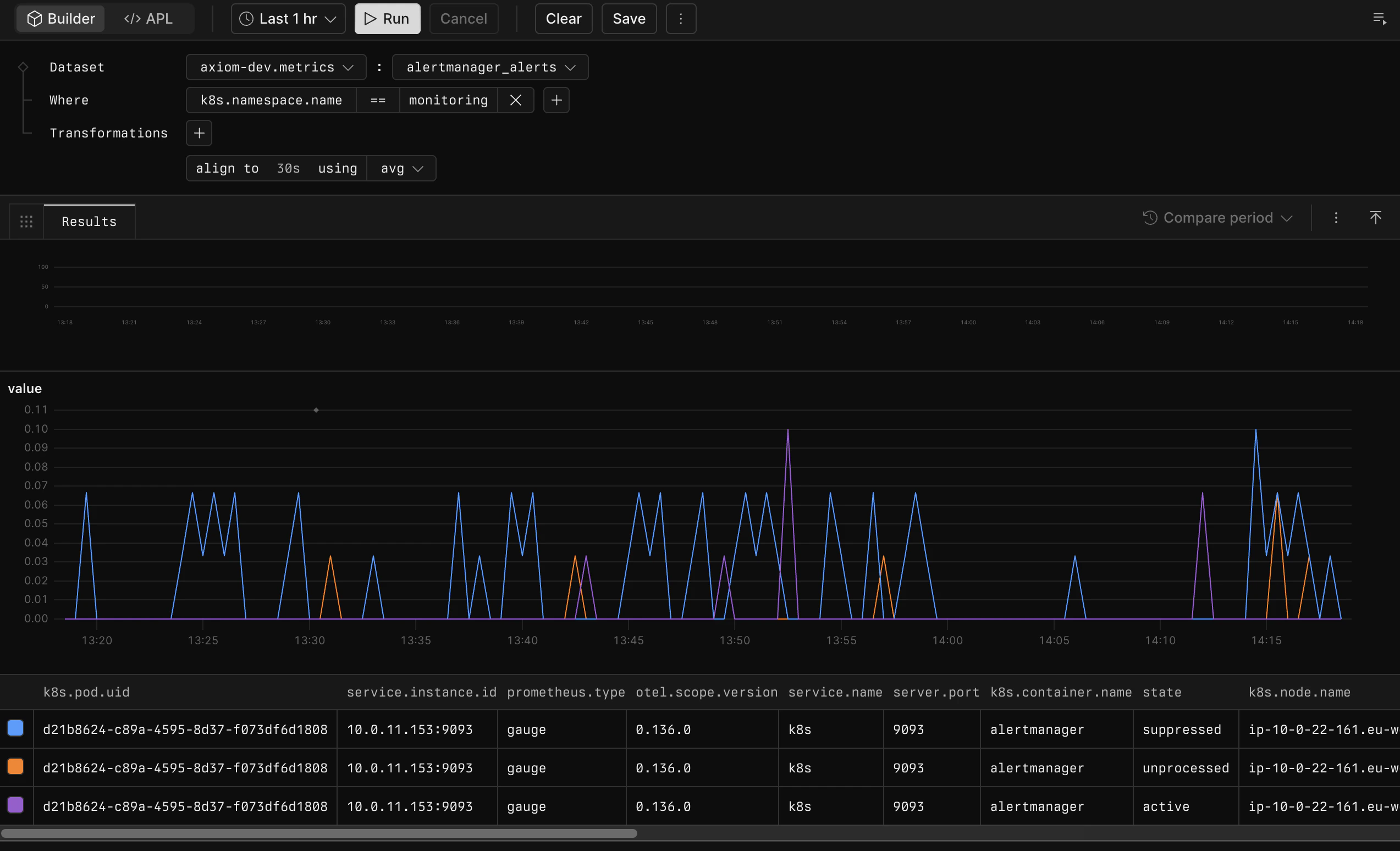
axiom-dev.metrics dataset’s alertmanager_alerts metric one hour before the current time. It filters results to events where k8s.namespace.name is monitoring and aggregates events over 30-second time windows into their average value.
Elements of queries
The following explains each element of a metrics query.Source
Specify the dataset and the metric in the Dataset field. The dataset and metric names are separated by a colon in the Builder interface. For example,axiom-dev.metrics:alertmanager_alerts.
Filter
Use the Where section to filter series based on tag values.- Click + in the Where section.
- Select the tag where you want to filter for values.
- Select the logical operator of the filter. Available operators are:
- Equality:
==,!= - Comparisons:
<,<=,>,>=
- Equality:
- Specify the value for which you want to filter.
- Click + to add another filter and join them with the logical and operator.
project == /.*metrics.*/ and code >= 200 and code < 300.
Transformations
Use the Transformations section to transform individual values or series.- Click + in the Transformations section.
- Select the transformation you want to apply to the data. Available transformations are:
- map: Map the data to a new value using the expression you specify.
- align: Aggregate data using the function and the time window you specify.
- group: Group the data by a set of tags using the aggregation function you specify.
- bucket Aggregate the data by time and tag dimensions simultaneously.
Map
Usemap to transform individual values.
Available mapping functions:
For example, to calculate rate per second for the metric, use
map rate. To fill empty values with the latest value, use map fill::prev.
Handle cumulative counter resets
Cumulative counters are metrics that only increase over time, such as total requests served or total errors counted. These counters can reset to zero when the source restarts (for example, due to a deployment, power cycle, or crash). When calculating rates or aggregating cumulative counters, usemap rate or align ... using prom::rate to correctly handle these resets:
map ratecomputes the per-second rate of change and treats any negative delta (where the new value is lower than the previous value) as a counter reset. It discards the data point spanning the reset and computes the rate from subsequent increases.align ... using prom::rateprovides PromQL-style rate calculation over a specified time window with the same counter-reset handling.
map rate with align ... using sum to sum the per-second rates back into totals over each interval.
Align
Usealign to aggregate over time windows. You can specify the time window and the aggregation function to apply.
Available aggregation functions:
For example, to calculate the average over 5-minute time windows, use
align to 5m using avg. To count the data points in the last hour, use align to 1h using count.
When metrics emit data at regular intervals but with different offsets across time series, align maps your data to a fixed set of time intervals. This makes it easier to visualize data from different sources on a single chart. If the alignment interval is shorter than the emission interval, some intervals can have null values. Select how to handle null values in the chart options.
Group
Usegroup to combine series by tags. You can specify the tags to group by and the aggregation function to apply. If you don’t specify tags, Axiom aggregates all series into one group.
Available aggregation functions:
For example:
- To calculate the number of series, use
group using count. - To sum the values of all series, use
group using sum. - To group data by the
projectandnamespacetags using thesumaggregation, usegroup by project, namespace using sum.
Bucket
Usebucket to aggregate over time and tag dimensions simultaneously.
Available aggregation functions:
For example:
- To calculate the average value per group and time interval, use
bucket using histogram(avg). - To also count the number of data points per group and time interval, use
bucket using histogram(count, avg).
To show the results of multiple aggregations in a single chart, use multiple functions.If you don’t specify tags with
bucket, Axiom applies the specified aggregations to all tags.When the underlying metric is a histogram, Axiom computes bucket aggregations using the interpolate_cumulative_histogram and interpolate_delta_histogram functions depending on the temporality used. For quantile aggregations, this estimates the quantile using the underlying histogram data.